Capture Activations and Attention Maps using PyTorch Hooks
Import Libraries
Click to expand
```python import os import torch import datasets import timm from PIL import Image import numpy as np import matplotlib.pyplot as plt from collections import OrderedDict import torch.nn.functional as F import math import inspect ```Mount Google Drive
Click to expand
```python from google.colab import drive drive.mount('/content/drive') ```Drive already mounted at /content/drive; to attempt to forcibly remount, call drive.mount("/content/drive", force_remount=True).
Click to expand
os.chdir('drive/MyDrive/Deep Learning Sample')Click to expand
```python os.getcwd() ```'/content/drive/MyDrive/Deep Learning Sample'
Download Imagenet Class Labels
Load All the images
Click to expand
```python os.listdir() ```['ViT_Base_Activation_Attention_Maps_Capture.ipynb',
'Sample Images',
'ViT_Base_Train.ipynb',
'imagenet_classes.txt']
Click to expand
```python os.listdir("Sample Images") ```['Lena_image.png', 'cat_dog_image.png', 'car_image.jpg']
Click to expand
```python lena_img_path = "Sample Images/Lena_image.png" cat_dog_img_path = "Sample Images/cat_dog_image.png" car_img_path = "Sample Images/car_image.jpg" ```Click to expand
```python lena_img_np = np.array(Image.open(lena_img_path)) cat_dog_img_np = np.array(Image.open(cat_dog_img_path)) car_img_np = np.array(Image.open(car_img_path)) ```Click to expand
```python import matplotlib.pyplot as plt fig, axes = plt.subplots(1, 3, figsize=(15, 5)) axes[0].imshow(lena_img_np) axes[0].set_title('Lena Image') axes[0].axis('on') axes[1].imshow(cat_dog_img_np) axes[1].set_title('Cat Dog Image') axes[1].axis('on') axes[2].imshow(car_img_np) axes[2].set_title('Car Image') axes[2].axis('on') plt.tight_layout() plt.show() ```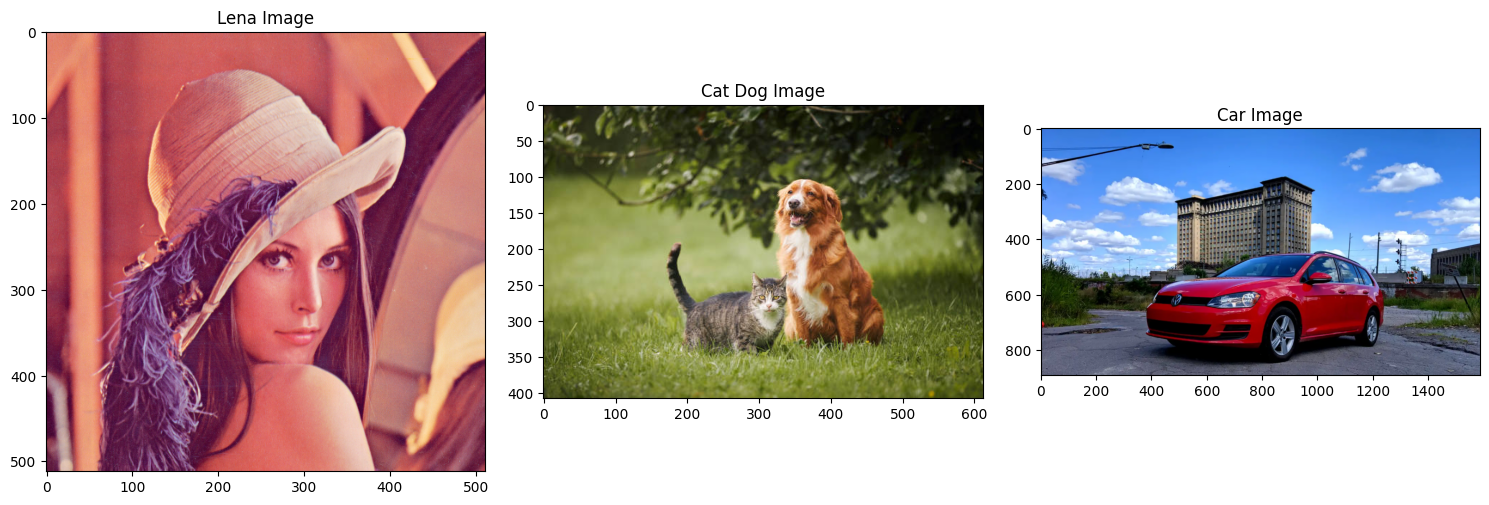
Preprocess images
Click to expand
```python def preprocess_img(img_np): img = torch.from_numpy(img_np).permute(2,0,1).float() / 255.0 img = F.interpolate(img.unsqueeze(0), size=(224,224), mode='bilinear', align_corners=False).squeeze(0) mean = torch.tensor([0.485, 0.456, 0.406]).view(3,1,1) std = torch.tensor([0.229, 0.224, 0.225]).view(3,1,1) img = (img - mean) / std return img ```Click to expand
```python print(f"{lena_img_np.shape=}") print(f"{cat_dog_img_np.shape=}") print(f"{car_img_np.shape=}") ```lena_img_np.shape=(512, 512, 3)
cat_dog_img_np.shape=(408, 612, 3)
car_img_np.shape=(890, 1588, 3)
Click to expand
```python import torch.nn.functional as F IMG_SIZE = 224 lena_img_tensor = preprocess_img(lena_img_np) print(f"{lena_img_tensor.shape=}") cat_dog_img_tensor = preprocess_img(cat_dog_img_np) print(f"{cat_dog_img_tensor.shape=}") car_img_tensor = preprocess_img(car_img_np) print(f"{car_img_tensor.shape=}") ```lena_img_tensor.shape=torch.Size([3, 224, 224])
cat_dog_img_tensor.shape=torch.Size([3, 224, 224])
car_img_tensor.shape=torch.Size([3, 224, 224])
Select a Model
Click to expand
```python timm.list_models("*vit_tiny*", pretrained=True) ```['convit_tiny.fb_in1k',
'crossvit_tiny_240.in1k',
'davit_tiny.msft_in1k',
'gcvit_tiny.in1k',
'maxvit_tiny_rw_224.sw_in1k',
'maxvit_tiny_tf_224.in1k',
'maxvit_tiny_tf_384.in1k',
'maxvit_tiny_tf_512.in1k',
'vit_tiny_patch16_224.augreg_in21k',
'vit_tiny_patch16_224.augreg_in21k_ft_in1k',
'vit_tiny_patch16_384.augreg_in21k_ft_in1k',
'vit_tiny_r_s16_p8_224.augreg_in21k',
'vit_tiny_r_s16_p8_224.augreg_in21k_ft_in1k',
'vit_tiny_r_s16_p8_384.augreg_in21k_ft_in1k']
Load the model
Click to expand
```python model = timm.create_model("vit_tiny_patch16_224.augreg_in21k_ft_in1k", pretrained=True) model.eval() ```/usr/local/lib/python3.12/dist-packages/huggingface_hub/utils/_auth.py:94: UserWarning:
The secret `HF_TOKEN` does not exist in your Colab secrets.
To authenticate with the Hugging Face Hub, create a token in your settings tab (https://huggingface.co/settings/tokens), set it as secret in your Google Colab and restart your session.
You will be able to reuse this secret in all of your notebooks.
Please note that authentication is recommended but still optional to access public models or datasets.
warnings.warn(
VisionTransformer(
(patch_embed): PatchEmbed(
(proj): Conv2d(3, 192, kernel_size=(16, 16), stride=(16, 16))
(norm): Identity()
)
(pos_drop): Dropout(p=0.0, inplace=False)
(patch_drop): Identity()
(norm_pre): Identity()
(blocks): Sequential(
(0): Block(
(norm1): LayerNorm((192,), eps=1e-06, elementwise_affine=True)
(attn): Attention(
(qkv): Linear(in_features=192, out_features=576, bias=True)
(q_norm): Identity()
(k_norm): Identity()
(attn_drop): Dropout(p=0.0, inplace=False)
(norm): Identity()
(proj): Linear(in_features=192, out_features=192, bias=True)
(proj_drop): Dropout(p=0.0, inplace=False)
)
(ls1): Identity()
(drop_path1): Identity()
(norm2): LayerNorm((192,), eps=1e-06, elementwise_affine=True)
(mlp): Mlp(
(fc1): Linear(in_features=192, out_features=768, bias=True)
(act): GELU(approximate='none')
(drop1): Dropout(p=0.0, inplace=False)
(norm): Identity()
(fc2): Linear(in_features=768, out_features=192, bias=True)
(drop2): Dropout(p=0.0, inplace=False)
)
(ls2): Identity()
(drop_path2): Identity()
)
(1): Block(
(norm1): LayerNorm((192,), eps=1e-06, elementwise_affine=True)
(attn): Attention(
(qkv): Linear(in_features=192, out_features=576, bias=True)
(q_norm): Identity()
(k_norm): Identity()
(attn_drop): Dropout(p=0.0, inplace=False)
(norm): Identity()
(proj): Linear(in_features=192, out_features=192, bias=True)
(proj_drop): Dropout(p=0.0, inplace=False)
)
(ls1): Identity()
(drop_path1): Identity()
(norm2): LayerNorm((192,), eps=1e-06, elementwise_affine=True)
(mlp): Mlp(
(fc1): Linear(in_features=192, out_features=768, bias=True)
(act): GELU(approximate='none')
(drop1): Dropout(p=0.0, inplace=False)
(norm): Identity()
(fc2): Linear(in_features=768, out_features=192, bias=True)
(drop2): Dropout(p=0.0, inplace=False)
)
(ls2): Identity()
(drop_path2): Identity()
)
(2): Block(
(norm1): LayerNorm((192,), eps=1e-06, elementwise_affine=True)
(attn): Attention(
(qkv): Linear(in_features=192, out_features=576, bias=True)
(q_norm): Identity()
(k_norm): Identity()
(attn_drop): Dropout(p=0.0, inplace=False)
(norm): Identity()
(proj): Linear(in_features=192, out_features=192, bias=True)
(proj_drop): Dropout(p=0.0, inplace=False)
)
(ls1): Identity()
(drop_path1): Identity()
(norm2): LayerNorm((192,), eps=1e-06, elementwise_affine=True)
(mlp): Mlp(
(fc1): Linear(in_features=192, out_features=768, bias=True)
(act): GELU(approximate='none')
(drop1): Dropout(p=0.0, inplace=False)
(norm): Identity()
(fc2): Linear(in_features=768, out_features=192, bias=True)
(drop2): Dropout(p=0.0, inplace=False)
)
(ls2): Identity()
(drop_path2): Identity()
)
(3): Block(
(norm1): LayerNorm((192,), eps=1e-06, elementwise_affine=True)
(attn): Attention(
(qkv): Linear(in_features=192, out_features=576, bias=True)
(q_norm): Identity()
(k_norm): Identity()
(attn_drop): Dropout(p=0.0, inplace=False)
(norm): Identity()
(proj): Linear(in_features=192, out_features=192, bias=True)
(proj_drop): Dropout(p=0.0, inplace=False)
)
(ls1): Identity()
(drop_path1): Identity()
(norm2): LayerNorm((192,), eps=1e-06, elementwise_affine=True)
(mlp): Mlp(
(fc1): Linear(in_features=192, out_features=768, bias=True)
(act): GELU(approximate='none')
(drop1): Dropout(p=0.0, inplace=False)
(norm): Identity()
(fc2): Linear(in_features=768, out_features=192, bias=True)
(drop2): Dropout(p=0.0, inplace=False)
)
(ls2): Identity()
(drop_path2): Identity()
)
(4): Block(
(norm1): LayerNorm((192,), eps=1e-06, elementwise_affine=True)
(attn): Attention(
(qkv): Linear(in_features=192, out_features=576, bias=True)
(q_norm): Identity()
(k_norm): Identity()
(attn_drop): Dropout(p=0.0, inplace=False)
(norm): Identity()
(proj): Linear(in_features=192, out_features=192, bias=True)
(proj_drop): Dropout(p=0.0, inplace=False)
)
(ls1): Identity()
(drop_path1): Identity()
(norm2): LayerNorm((192,), eps=1e-06, elementwise_affine=True)
(mlp): Mlp(
(fc1): Linear(in_features=192, out_features=768, bias=True)
(act): GELU(approximate='none')
(drop1): Dropout(p=0.0, inplace=False)
(norm): Identity()
(fc2): Linear(in_features=768, out_features=192, bias=True)
(drop2): Dropout(p=0.0, inplace=False)
)
(ls2): Identity()
(drop_path2): Identity()
)
(5): Block(
(norm1): LayerNorm((192,), eps=1e-06, elementwise_affine=True)
(attn): Attention(
(qkv): Linear(in_features=192, out_features=576, bias=True)
(q_norm): Identity()
(k_norm): Identity()
(attn_drop): Dropout(p=0.0, inplace=False)
(norm): Identity()
(proj): Linear(in_features=192, out_features=192, bias=True)
(proj_drop): Dropout(p=0.0, inplace=False)
)
(ls1): Identity()
(drop_path1): Identity()
(norm2): LayerNorm((192,), eps=1e-06, elementwise_affine=True)
(mlp): Mlp(
(fc1): Linear(in_features=192, out_features=768, bias=True)
(act): GELU(approximate='none')
(drop1): Dropout(p=0.0, inplace=False)
(norm): Identity()
(fc2): Linear(in_features=768, out_features=192, bias=True)
(drop2): Dropout(p=0.0, inplace=False)
)
(ls2): Identity()
(drop_path2): Identity()
)
(6): Block(
(norm1): LayerNorm((192,), eps=1e-06, elementwise_affine=True)
(attn): Attention(
(qkv): Linear(in_features=192, out_features=576, bias=True)
(q_norm): Identity()
(k_norm): Identity()
(attn_drop): Dropout(p=0.0, inplace=False)
(norm): Identity()
(proj): Linear(in_features=192, out_features=192, bias=True)
(proj_drop): Dropout(p=0.0, inplace=False)
)
(ls1): Identity()
(drop_path1): Identity()
(norm2): LayerNorm((192,), eps=1e-06, elementwise_affine=True)
(mlp): Mlp(
(fc1): Linear(in_features=192, out_features=768, bias=True)
(act): GELU(approximate='none')
(drop1): Dropout(p=0.0, inplace=False)
(norm): Identity()
(fc2): Linear(in_features=768, out_features=192, bias=True)
(drop2): Dropout(p=0.0, inplace=False)
)
(ls2): Identity()
(drop_path2): Identity()
)
(7): Block(
(norm1): LayerNorm((192,), eps=1e-06, elementwise_affine=True)
(attn): Attention(
(qkv): Linear(in_features=192, out_features=576, bias=True)
(q_norm): Identity()
(k_norm): Identity()
(attn_drop): Dropout(p=0.0, inplace=False)
(norm): Identity()
(proj): Linear(in_features=192, out_features=192, bias=True)
(proj_drop): Dropout(p=0.0, inplace=False)
)
(ls1): Identity()
(drop_path1): Identity()
(norm2): LayerNorm((192,), eps=1e-06, elementwise_affine=True)
(mlp): Mlp(
(fc1): Linear(in_features=192, out_features=768, bias=True)
(act): GELU(approximate='none')
(drop1): Dropout(p=0.0, inplace=False)
(norm): Identity()
(fc2): Linear(in_features=768, out_features=192, bias=True)
(drop2): Dropout(p=0.0, inplace=False)
)
(ls2): Identity()
(drop_path2): Identity()
)
(8): Block(
(norm1): LayerNorm((192,), eps=1e-06, elementwise_affine=True)
(attn): Attention(
(qkv): Linear(in_features=192, out_features=576, bias=True)
(q_norm): Identity()
(k_norm): Identity()
(attn_drop): Dropout(p=0.0, inplace=False)
(norm): Identity()
(proj): Linear(in_features=192, out_features=192, bias=True)
(proj_drop): Dropout(p=0.0, inplace=False)
)
(ls1): Identity()
(drop_path1): Identity()
(norm2): LayerNorm((192,), eps=1e-06, elementwise_affine=True)
(mlp): Mlp(
(fc1): Linear(in_features=192, out_features=768, bias=True)
(act): GELU(approximate='none')
(drop1): Dropout(p=0.0, inplace=False)
(norm): Identity()
(fc2): Linear(in_features=768, out_features=192, bias=True)
(drop2): Dropout(p=0.0, inplace=False)
)
(ls2): Identity()
(drop_path2): Identity()
)
(9): Block(
(norm1): LayerNorm((192,), eps=1e-06, elementwise_affine=True)
(attn): Attention(
(qkv): Linear(in_features=192, out_features=576, bias=True)
(q_norm): Identity()
(k_norm): Identity()
(attn_drop): Dropout(p=0.0, inplace=False)
(norm): Identity()
(proj): Linear(in_features=192, out_features=192, bias=True)
(proj_drop): Dropout(p=0.0, inplace=False)
)
(ls1): Identity()
(drop_path1): Identity()
(norm2): LayerNorm((192,), eps=1e-06, elementwise_affine=True)
(mlp): Mlp(
(fc1): Linear(in_features=192, out_features=768, bias=True)
(act): GELU(approximate='none')
(drop1): Dropout(p=0.0, inplace=False)
(norm): Identity()
(fc2): Linear(in_features=768, out_features=192, bias=True)
(drop2): Dropout(p=0.0, inplace=False)
)
(ls2): Identity()
(drop_path2): Identity()
)
(10): Block(
(norm1): LayerNorm((192,), eps=1e-06, elementwise_affine=True)
(attn): Attention(
(qkv): Linear(in_features=192, out_features=576, bias=True)
(q_norm): Identity()
(k_norm): Identity()
(attn_drop): Dropout(p=0.0, inplace=False)
(norm): Identity()
(proj): Linear(in_features=192, out_features=192, bias=True)
(proj_drop): Dropout(p=0.0, inplace=False)
)
(ls1): Identity()
(drop_path1): Identity()
(norm2): LayerNorm((192,), eps=1e-06, elementwise_affine=True)
(mlp): Mlp(
(fc1): Linear(in_features=192, out_features=768, bias=True)
(act): GELU(approximate='none')
(drop1): Dropout(p=0.0, inplace=False)
(norm): Identity()
(fc2): Linear(in_features=768, out_features=192, bias=True)
(drop2): Dropout(p=0.0, inplace=False)
)
(ls2): Identity()
(drop_path2): Identity()
)
(11): Block(
(norm1): LayerNorm((192,), eps=1e-06, elementwise_affine=True)
(attn): Attention(
(qkv): Linear(in_features=192, out_features=576, bias=True)
(q_norm): Identity()
(k_norm): Identity()
(attn_drop): Dropout(p=0.0, inplace=False)
(norm): Identity()
(proj): Linear(in_features=192, out_features=192, bias=True)
(proj_drop): Dropout(p=0.0, inplace=False)
)
(ls1): Identity()
(drop_path1): Identity()
(norm2): LayerNorm((192,), eps=1e-06, elementwise_affine=True)
(mlp): Mlp(
(fc1): Linear(in_features=192, out_features=768, bias=True)
(act): GELU(approximate='none')
(drop1): Dropout(p=0.0, inplace=False)
(norm): Identity()
(fc2): Linear(in_features=768, out_features=192, bias=True)
(drop2): Dropout(p=0.0, inplace=False)
)
(ls2): Identity()
(drop_path2): Identity()
)
)
(norm): LayerNorm((192,), eps=1e-06, elementwise_affine=True)
(fc_norm): Identity()
(head_drop): Dropout(p=0.0, inplace=False)
(head): Linear(in_features=192, out_features=1000, bias=True)
)
Hooks to capture activations
Click to expand
```python activations_od = OrderedDict() ```Click to expand
```python len(model._modules['blocks']) ```12
Click to expand
```python model._modules['blocks'][11] ```Block(
(norm1): LayerNorm((192,), eps=1e-06, elementwise_affine=True)
(attn): Attention(
(qkv): Linear(in_features=192, out_features=576, bias=True)
(q_norm): Identity()
(k_norm): Identity()
(attn_drop): Dropout(p=0.0, inplace=False)
(norm): Identity()
(proj): Linear(in_features=192, out_features=192, bias=True)
(proj_drop): Dropout(p=0.0, inplace=False)
)
(ls1): Identity()
(drop_path1): Identity()
(norm2): LayerNorm((192,), eps=1e-06, elementwise_affine=True)
(mlp): Mlp(
(fc1): Linear(in_features=192, out_features=768, bias=True)
(act): GELU(approximate='none')
(drop1): Dropout(p=0.0, inplace=False)
(norm): Identity()
(fc2): Linear(in_features=768, out_features=192, bias=True)
(drop2): Dropout(p=0.0, inplace=False)
)
(ls2): Identity()
(drop_path2): Identity()
)
Here I am trying to capture activation, for a forward hook there are three inputs, the module the hook is applied to, input tensor to that module, and the output of that module, since we are need activation we need the output tensor of each layer.
Before writing the hook, you need to examine the model architecture
I am using hook_handles to keep track of the hooks that I register. At the end of the entire pipeline, I can remove the hooks easily.
If I don’t remove hooks, each time I run this below code cell, new hook will be registerd resulting in duplicate outputs.
Since each hook adds computation, depending on the processing you do inside the hook, hooks can slow down inference/training
Click to expand
```python hook_handles = [] ```Click to expand
```python def get_activations(name:str): def activation_hook(module, input, output): activations_od[name] = output.detach() return activation_hook ```Click to expand
```python # Add hooks to all the blocks to layerwise activations for i, block in enumerate(model._modules['blocks']): h = block.register_forward_hook(get_activations(f"block_{i}")) hook_handles.append(h) ```Hooks to capture Attention Maps
Attention Map is the most important place when it comes to information flow. Because information mixing (information from one token to another token flows throught attention maps) happens.
\text{Softmax}(Q K^\top)
Click to expand
```python model._modules['blocks'][11].attn ```Attention(
(qkv): Linear(in_features=192, out_features=576, bias=True)
(q_norm): Identity()
(k_norm): Identity()
(attn_drop): Dropout(p=0.0, inplace=False)
(norm): Identity()
(proj): Linear(in_features=192, out_features=192, bias=True)
(proj_drop): Dropout(p=0.0, inplace=False)
)
Click to expand
```python print(inspect.getsource(model._modules['blocks'][11].attn.forward)) ``` def forward(
self,
x: torch.Tensor,
attn_mask: Optional[torch.Tensor] = None,
) -> torch.Tensor:
B, N, C = x.shape
qkv = self.qkv(x).reshape(B, N, 3, self.num_heads, self.head_dim).permute(2, 0, 3, 1, 4)
q, k, v = qkv.unbind(0)
q, k = self.q_norm(q), self.k_norm(k)
if self.fused_attn:
x = F.scaled_dot_product_attention(
q, k, v,
attn_mask=attn_mask,
dropout_p=self.attn_drop.p if self.training else 0.,
)
else:
q = q * self.scale
attn = q @ k.transpose(-2, -1)
attn = maybe_add_mask(attn, attn_mask)
attn = attn.softmax(dim=-1)
attn = self.attn_drop(attn)
x = attn @ v
x = x.transpose(1, 2).reshape(B, N, C)
x = self.norm(x)
x = self.proj(x)
x = self.proj_drop(x)
return x
Click to expand
```python model._modules['blocks'][11].attn.fused_attn ```True
Click to expand
```python model._modules['blocks'][11].attn.fused_attn = False ```Since self.fused_attn is True, we can’t capture attention map directly. (We can do it by manually setting for all the layer_idx, model._modules['blocks'][layer_idx].attn.fused_attn = False and then directly capture attn, but for this example let’s consider the worst case, when you can’t capture attention map directly.)
This F.scaled_dot_product_attention does not inherit from nn.Module(), therefore we cannot define hooks for this
This is the line responsible for calculating q, k embeddings before calculating attention.
q, k = self.q_norm(q), self.k_norm(k)
Click to expand
```python model._modules['blocks'][11].attn.q_norm ```Identity()
Click to expand
```python model._modules['blocks'][11].attn.k_norm ```Identity()
If we register hooks for these layers, we can capture q, k embeddings separately. Then after some processing using
Click to expand
```python q = q * self.scale attn = q @ k.transpose(-2, -1) ```We can get the attention map.
Click to expand
```python attention_maps_od = OrderedDict() q_embeddings_od = OrderedDict() k_embeddings_od = OrderedDict() ```Click to expand
```python type(model._modules['blocks'][11].attn.scale), model._modules['blocks'][11].attn.scale ```(float, 0.125)
Click to expand
```python def get_query_activations(name:str, q_scale:float): def query_activation_hook(module, input, output): q_embeddings_od[name] = output.detach() * q_scale # Here we need to pass q_scale as well, just like in the source code return query_activation_hook def get_key_activations(name:str): def key_activation_hook(module, input, output): k_embeddings_od[name] = output.detach() return key_activation_hook ```Click to expand
```python # Add hooks to all the blocks to layerwise activations for i, block in enumerate(model._modules['blocks']): attn_block = block._modules['attn'] # print(attn_block) # print(attn_block.scale) h1 = attn_block.q_norm.register_forward_hook(get_query_activations(f"block_{i}", attn_block.scale)) h2 = attn_block.k_norm.register_forward_hook(get_key_activations(f"block_{i}")) hook_handles.append(h1) hook_handles.append(h2) ```I am going to add another hooks to compute the attention map, right after the attention map. It is certain that the MLP layer is called right after the attention map. This might not be the best way to compute attn_map, But I need to compute along the forward pass
Note that I have ignored the attention mask, because in our case we are using an image, no need to mask tokens.
Click to expand
```python def get_attention_maps(name:str): def compute_attn_map_hook(module, input, output): print(name) q = q_embeddings_od[name] k = k_embeddings_od[name] print("\tq shape", q.shape) print("\tk shape", k.shape) attn = q @ k.transpose(-2, -1) print("\tAttention Map shape before softmax", attn.shape) attention_maps_od[name] = attn.softmax(dim=-1) print("\tAttention Map shape after softmax", attention_maps_od[name].shape) return compute_attn_map_hook ```Click to expand
```python # Add hooks to trigger computing the attenion maps for i, block in enumerate(model._modules['blocks']): mlp_block = block._modules['mlp'] # Forward function of 'MLP' block is guranteed to call after Attention block, There are some implementations # layer(x) = MLP(x) + Attn(x) but in our case layer(x) = MLP(Attn(x)) ( I found this implementation in Moondream VLM model, # so please inspect carefully before using this way) h = mlp_block.register_forward_hook(get_attention_maps(f"block_{i}")) hook_handles.append(h) ```Inference
Click to expand
```python x = cat_dog_img_tensor.unsqueeze(0) with torch.inference_mode(): output = model(x) ```block_0
q shape torch.Size([1, 3, 197, 64])
k shape torch.Size([1, 3, 197, 64])
Attention Map shape before softmax torch.Size([1, 3, 197, 197])
Attention Map shape after softmax torch.Size([1, 3, 197, 197])
block_1
q shape torch.Size([1, 3, 197, 64])
k shape torch.Size([1, 3, 197, 64])
Attention Map shape before softmax torch.Size([1, 3, 197, 197])
Attention Map shape after softmax torch.Size([1, 3, 197, 197])
block_2
q shape torch.Size([1, 3, 197, 64])
k shape torch.Size([1, 3, 197, 64])
Attention Map shape before softmax torch.Size([1, 3, 197, 197])
Attention Map shape after softmax torch.Size([1, 3, 197, 197])
block_3
q shape torch.Size([1, 3, 197, 64])
k shape torch.Size([1, 3, 197, 64])
Attention Map shape before softmax torch.Size([1, 3, 197, 197])
Attention Map shape after softmax torch.Size([1, 3, 197, 197])
block_4
q shape torch.Size([1, 3, 197, 64])
k shape torch.Size([1, 3, 197, 64])
Attention Map shape before softmax torch.Size([1, 3, 197, 197])
Attention Map shape after softmax torch.Size([1, 3, 197, 197])
block_5
q shape torch.Size([1, 3, 197, 64])
k shape torch.Size([1, 3, 197, 64])
Attention Map shape before softmax torch.Size([1, 3, 197, 197])
Attention Map shape after softmax torch.Size([1, 3, 197, 197])
block_6
q shape torch.Size([1, 3, 197, 64])
k shape torch.Size([1, 3, 197, 64])
Attention Map shape before softmax torch.Size([1, 3, 197, 197])
Attention Map shape after softmax torch.Size([1, 3, 197, 197])
block_7
q shape torch.Size([1, 3, 197, 64])
k shape torch.Size([1, 3, 197, 64])
Attention Map shape before softmax torch.Size([1, 3, 197, 197])
Attention Map shape after softmax torch.Size([1, 3, 197, 197])
block_8
q shape torch.Size([1, 3, 197, 64])
k shape torch.Size([1, 3, 197, 64])
Attention Map shape before softmax torch.Size([1, 3, 197, 197])
Attention Map shape after softmax torch.Size([1, 3, 197, 197])
block_9
q shape torch.Size([1, 3, 197, 64])
k shape torch.Size([1, 3, 197, 64])
Attention Map shape before softmax torch.Size([1, 3, 197, 197])
Attention Map shape after softmax torch.Size([1, 3, 197, 197])
block_10
q shape torch.Size([1, 3, 197, 64])
k shape torch.Size([1, 3, 197, 64])
Attention Map shape before softmax torch.Size([1, 3, 197, 197])
Attention Map shape after softmax torch.Size([1, 3, 197, 197])
block_11
q shape torch.Size([1, 3, 197, 64])
k shape torch.Size([1, 3, 197, 64])
Attention Map shape before softmax torch.Size([1, 3, 197, 197])
Attention Map shape after softmax torch.Size([1, 3, 197, 197])
Click to expand
```python # output shape (1, 1000) probabilities = torch.nn.functional.softmax(output, dim=-1) top5_prob, top5_indices = torch.topk(probabilities, 5) # Read the ImageNet class labels with open("imagenet_classes.txt", "r") as f: categories = [s.strip() for s in f.readlines()] top_prob, top_idx = torch.topk(probabilities, 1) print("Top 5 predictions:") for i in range(5): cls_label = categories[top5_indices[0, i]] prob = top5_prob[0, i].item() print(f"{cls_label:<20} {prob:.4f}") ```Top 5 predictions:
bloodhound 0.1940
Cardigan 0.0847
EntleBucher 0.0785
German shepherd 0.0714
Irish setter 0.0594
Click to expand
```python ```Sanity Check
Click to expand
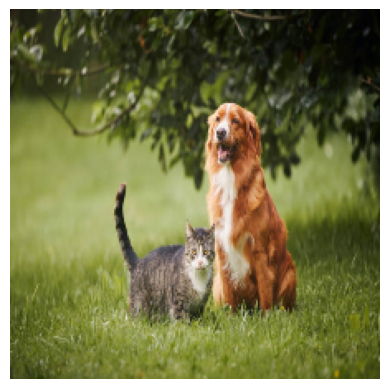
```python import torch import matplotlib.pyplot as plt IMAGENET_MEAN = torch.tensor([0.485, 0.456, 0.406]).view(1,3,1,1) IMAGENET_STD = torch.tensor([0.229, 0.224, 0.225]).view(1,3,1,1) def visualize_tensor(x, normalized=True): print("Input shape:", x.shape) # Remove batch dimension if present if x.dim() == 4 and x.shape[0] == 1: x = x[0] # Remove extra dim if shaped like (1, 3, 224, 224) while x.dim() > 3: x = x.squeeze(0) # Now x must be (3, H, W) if x.dim() != 3: raise ValueError(f"Expected 3D image tensor, got {x.dim()}D") # Denorm if normalized: mean = torch.tensor([0.485, 0.456, 0.406]).view(3,1,1) std = torch.tensor([0.229, 0.224, 0.225]).view(3,1,1) x = x * std + mean img = x.permute(1, 2, 0).clamp(0,1).cpu().numpy() plt.imshow(img) plt.axis("off") plt.show() def sanity_check(x, output, categories=None, normalized=True): print("=== INPUT CHECK ===") print("shape:", x.shape) # (1, 3, 224, 224) print("dtype:", x.dtype) print("min / max / mean:", x.min().item(), x.max().item(), x.mean().item()) print("contains NaNs:", torch.isnan(x).any().item()) print("\n=== MODEL OUTPUT CHECK ===") print("output shape:", output.shape) # (1, 1000) print("output contains NaNs:", torch.isnan(output).any().item()) probs = output.softmax(dim=-1) print("softmax sum:", probs.sum().item()) # should be ~1 top_prob, top_idx = probs.topk(5) print("\n=== TOP-5 PREDICTIONS ===") for i in range(5): # Use top_idx for class label, and handle cases where categories might still be None cls_label = categories[top_idx[0, i]] if categories else f"Index: {top_idx[0, i].item()}" print(f"{cls_label:<20} {top_prob[0, i].item():.4f}") print("\n=== VISUALIZATION ===") visualize_tensor(x, normalized=normalized) ```Click to expand
```python sanity_check(x, output, categories=categories) ```=== INPUT CHECK ===
shape: torch.Size([1, 3, 224, 224])
dtype: torch.float32
min / max / mean: -2.117535352706909 2.51375150680542 -0.41202208399772644
contains NaNs: False
=== MODEL OUTPUT CHECK ===
output shape: torch.Size([1, 1000])
output contains NaNs: False
softmax sum: 0.9999998807907104
=== TOP-5 PREDICTIONS ===
bloodhound 0.1940
Cardigan 0.0847
EntleBucher 0.0785
German shepherd 0.0714
Irish setter 0.0594
=== VISUALIZATION ===
Input shape: torch.Size([1, 3, 224, 224])
Delete Hooks
Click to expand
```python for h in hook_handles: h.remove() ```Process Hooks Outputs
Click to expand
```python for k, v in activations_od.items(): print(k, v.shape) ```block_0 torch.Size([1, 197, 192])
block_1 torch.Size([1, 197, 192])
block_2 torch.Size([1, 197, 192])
block_3 torch.Size([1, 197, 192])
block_4 torch.Size([1, 197, 192])
block_5 torch.Size([1, 197, 192])
block_6 torch.Size([1, 197, 192])
block_7 torch.Size([1, 197, 192])
block_8 torch.Size([1, 197, 192])
block_9 torch.Size([1, 197, 192])
block_10 torch.Size([1, 197, 192])
block_11 torch.Size([1, 197, 192])
Visualize Activations
Activation Visualization for one layer
Click to expand
```python # Remove batch dimension & Removd [CLS] token & take mean so that I can get one 1 vector activation_patches = activations_od['block_0'].squeeze(0)[1:,:].mean(dim=-1) activation_patches.shape # [196] NUM_PATCHES = int(math.sqrt(activation_patches.shape[0])) NUM_PATCHES # 14 IMG_SIZE # 224 PATCH_SIZE = int(activation_patches.shape[0] / NUM_PATCHES) # 16 ```Click to expand
```python # Reshape to 2D grid activation_grid = activation_patches.view(NUM_PATCHES, NUM_PATCHES) # [14, 14] ```Click to expand
```python INTERPOLATION_METHOD = 'nearest' # ['nearest' , 'bilinear' ] activation_map = activation_grid.unsqueeze(0).unsqueeze(0) # [1, 1, 14, 14] if INTERPOLATION_METHOD == 'nearest': # Upsample to image size using nearest neighbor (each value becomes 16x16 block) activation_resized = F.interpolate( activation_map, size=(IMG_SIZE, IMG_SIZE), # [224, 224] mode='nearest' ) # [1, 1, 224, 224] elif INTERPOLATION_METHOD == 'bilinear': activation_resized = F.interpolate( activation_map, size=(IMG_SIZE, IMG_SIZE), # [224, 224] mode='bilinear', align_corners=False ) activation_resized = activation_resized.squeeze() # [224, 224] ```Click to expand
```python activation_resized.shape ```torch.Size([224, 224])
Click to expand
```python def visualize_activation_overlay(x, activation_map, normalized=True, alpha=0.5, cmap='jet'): """ Overlay activation heatmap on original image Args: x: Image tensor (1, 3, 224, 224) or (3, 224, 224) activation_map: Activation heatmap (224, 224) normalized: Whether x is ImageNet normalized alpha: Transparency of heatmap (0=invisible, 1=opaque) cmap: Colormap for heatmap ('jet', 'viridis', 'hot', etc.) """ # Process image if x.dim() == 4 and x.shape[0] == 1: x = x[0] # Denormalize if needed if normalized: mean = torch.tensor([0.485, 0.456, 0.406]).view(3,1,1) std = torch.tensor([0.229, 0.224, 0.225]).view(3,1,1) x = x * std + mean # Convert to numpy (H, W, 3) img = x.permute(1, 2, 0).clamp(0, 1).cpu().numpy() # Normalize activation map to [0, 1] act = activation_map.cpu().numpy() act = (act - act.min()) / (act.max() - act.min() + 1e-8) # Create figure with subplots fig, axes = plt.subplots(1, 3, figsize=(15, 5)) # Original image axes[0].imshow(img) axes[0].set_title('Original Image') axes[0].axis('off') # Heatmap only heatmap = axes[1].imshow(act, cmap=cmap) axes[1].set_title('Activation Heatmap') axes[1].axis('off') plt.colorbar(heatmap, ax=axes[1], fraction=0.046) # Overlay axes[2].imshow(img) axes[2].imshow(act, cmap=cmap, alpha=alpha) axes[2].set_title(f'Overlay (alpha={alpha})') axes[2].axis('off') plt.tight_layout() plt.show() visualize_activation_overlay(x, activation_resized, normalized=True, alpha=0.5) ```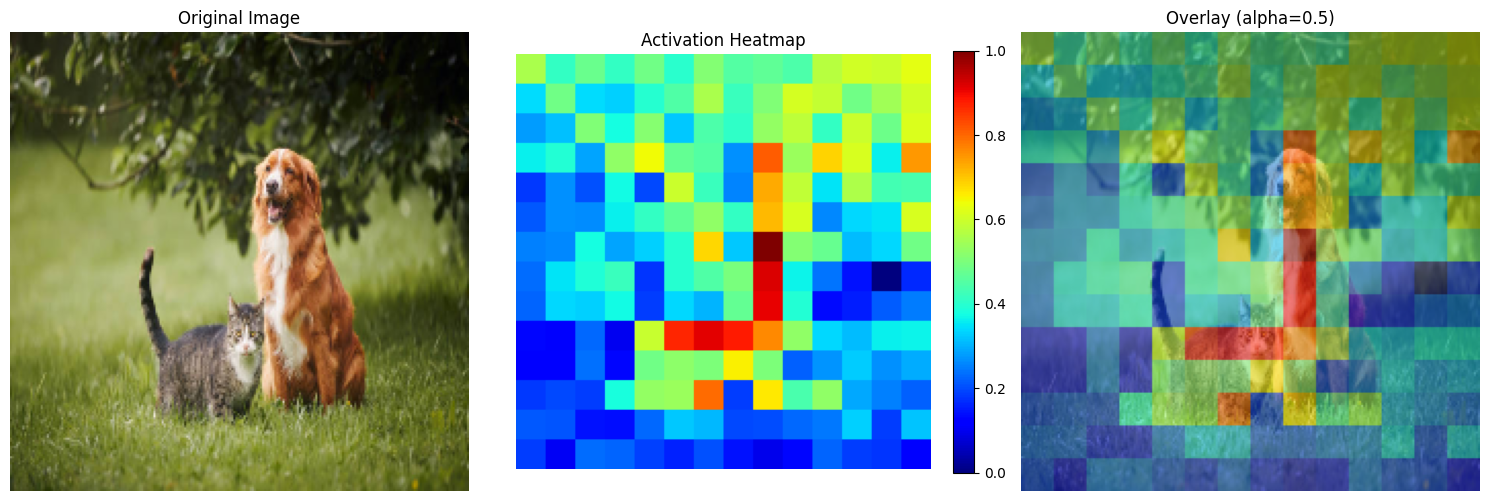
Activation Visualization over layers
Click to expand
```python import matplotlib.pyplot as plt import torch import torch.nn.functional as F import math def visualize_all_layers(x, activations_od, normalized=True, alpha=0.5, cmap='jet', interpolation='bilinear'): """ Visualize activation heatmaps for all layers Args: x: Image tensor (1, 3, 224, 224) activations_od: OrderedDict with activations from all layers normalized: Whether x is ImageNet normalized alpha: Transparency of overlay cmap: Colormap for heatmap interpolation: 'nearest' or 'bilinear' """ # Process original image once if x.dim() == 4 and x.shape[0] == 1: x_img = x[0] if normalized: mean = torch.tensor([0.485, 0.456, 0.406]).view(3,1,1) std = torch.tensor([0.229, 0.224, 0.225]).view(3,1,1) x_img = x_img * std + mean img = x_img.permute(1, 2, 0).clamp(0, 1).cpu().numpy() # Get number of layers num_layers = len(activations_od) # Create figure: 2 rows (heatmap, overlay) x num_layers columns fig, axes = plt.subplots(2, num_layers, figsize=(4 * num_layers, 8)) # Handle single layer case if num_layers == 1: axes = axes.reshape(2, 1) for idx, (layer_name, activation_tensor) in enumerate(activations_od.items()): # Process activation # Remove batch dimension & Remove [CLS] token & take mean activation_patches = activation_tensor.squeeze(0)[1:, :].mean(dim=-1) # [196] or [N] NUM_PATCHES = int(math.sqrt(activation_patches.shape[0])) IMG_SIZE = x.shape[-1] # 224 # Reshape to 2D grid activation_grid = activation_patches.view(NUM_PATCHES, NUM_PATCHES) # Upsample to image size activation_map = activation_grid.unsqueeze(0).unsqueeze(0) if interpolation == 'nearest': activation_resized = F.interpolate( activation_map, size=(IMG_SIZE, IMG_SIZE), mode='nearest' ) else: # bilinear activation_resized = F.interpolate( activation_map, size=(IMG_SIZE, IMG_SIZE), mode='bilinear', align_corners=False ) activation_resized = activation_resized.squeeze() # [224, 224] # Normalize activation to [0, 1] act = activation_resized.cpu().numpy() act = (act - act.min()) / (act.max() - act.min() + 1e-8) # Row 0: Heatmap only im = axes[0, idx].imshow(act, cmap=cmap) axes[0, idx].set_title(f'{layer_name}\nHeatmap') axes[0, idx].axis('off') plt.colorbar(im, ax=axes[0, idx], fraction=0.046) # Row 1: Overlay axes[1, idx].imshow(img) axes[1, idx].imshow(act, cmap=cmap, alpha=alpha) axes[1, idx].set_title(f'{layer_name}\nOverlay') axes[1, idx].axis('off') plt.tight_layout() plt.show() ```Click to expand
```python visualize_all_layers(x, activations_od, normalized=False, alpha=0.6, interpolation='nearest') # Here there is a bug in mean error ```
Click to expand
```python # Check activation statistics for each layer for layer_name, activation_tensor in activations_od.items(): activation_patches = activation_tensor.squeeze(0)[1:, :].mean(dim=-1) print(f"\n{layer_name}:") print(f" Mean: {activation_patches.mean():.4f}") print(f" Std: {activation_patches.std():.4f}") print(f" Min: {activation_patches.min():.4f}") print(f" Max: {activation_patches.max():.4f}") print(f" Range: {(activation_patches.max() - activation_patches.min()):.4f}") ```block_0:
Mean: -0.0706
Std: 0.0665
Min: -0.2075
Max: 0.1447
Range: 0.3522
block_1:
Mean: -0.0545
Std: 0.0619
Min: -0.1846
Max: 0.1514
Range: 0.3360
block_2:
Mean: -0.0568
Std: 0.0610
Min: -0.1851
Max: 0.1482
Range: 0.3332
block_3:
Mean: -0.0530
Std: 0.0605
Min: -0.1815
Max: 0.1484
Range: 0.3298
block_4:
Mean: -0.0511
Std: 0.0593
Min: -0.1766
Max: 0.1461
Range: 0.3227
block_5:
Mean: -0.0455
Std: 0.0584
Min: -0.1641
Max: 0.1456
Range: 0.3097
block_6:
Mean: -0.0473
Std: 0.0588
Min: -0.1632
Max: 0.1392
Range: 0.3024
block_7:
Mean: -0.0755
Std: 0.2112
Min: -1.6499
Max: 0.1304
Range: 1.7802
block_8:
Mean: -0.0818
Std: 0.2110
Min: -1.6529
Max: 0.1241
Range: 1.7770
block_9:
Mean: -0.0815
Std: 0.2111
Min: -1.6535
Max: 0.1283
Range: 1.7818
block_10:
Mean: -0.0854
Std: 0.2111
Min: -1.6547
Max: 0.1287
Range: 1.7834
block_11:
Mean: -0.0719
Std: 0.2140
Min: -1.6685
Max: 0.1442
Range: 1.8127
Visualize Attention Maps
Click to expand
```python len(attention_maps_od) ```12
Click to expand
```python attention_maps_od['block_0'].shape ```torch.Size([1, 3, 197, 197])
Click to expand
```python model.patch_embed ```PatchEmbed(
(proj): Conv2d(3, 192, kernel_size=(16, 16), stride=(16, 16))
(norm): Identity()
)
Click to expand
```python model.blocks[0].attn.num_heads ```3
When image is processed in ViT-Tiny to get patch embeddings, Conv2d layer is used with 192 filters with 3 kernels per each filter (16x16) with stride 16.
So in the later layers, we have 192 features to process. In each layer, there are 3 heads. Therefore each head is responsible for processing 192/3 = 64 features. This results in one attention map per each attention head.
Notice in attention_maps_od['block_0'].shape = (1, 3, 197, 197) 3 is the number of attention maps (number of attention heads) per layer, and 197 refers to the number of tokens.
197 = [CLS] token + 196 image Patch tokens (In ViT)
If we considered DeiT model, there should be another token responsible for distillation.
Visualize Attention Map of a Single Layer
Click to expand
```python # Sanity check to see whether the sum is 1 along the row axis (Considering only one attention head) attention_maps_od['block_0'].squeeze(0)[0, 0, :].sum() ```tensor(1.0000)
Click to expand
```python # Get the mean about heads attention_maps_od['block_0'].squeeze(0)[:, :, :].mean(dim=0).shape ```torch.Size([197, 197])
Click to expand
```python # Only consider the first row because first row is "How [CLS] token attends to itself and other image patch tokens" attention_maps_od['block_0'].squeeze(0)[:, : , :].mean(dim=0)[0,:].shape ```torch.Size([197])
Click to expand
```python # Now we can remove the first element of this row, that elements shows how [CLS] token attends to itself attn_slice = attention_maps_od['block_0'].squeeze(0)[:, : , :].mean(dim=0)[0,1:] attn_slice.shape ```torch.Size([196])
Click to expand
```python # now I am going to use softmax so that we will get a new probability distribtution after removing the first element attn_slice = F.softmax(attn_slice, dim=0) attn_slice.shape ```torch.Size([196])
Click to expand
```python NUM_PATCHES = int(math.sqrt(attention_maps_od['block_0'].squeeze(0)[:, : , :].mean(dim=0)[0,1:].shape[0])) attn_slice = attn_slice.view(NUM_PATCHES, NUM_PATCHES) attn_slice.shape ```torch.Size([14, 14])
Click to expand
```python for k, v in attention_maps_od.items(): print(k, v.shape) ```block_0 torch.Size([1, 3, 197, 197])
block_1 torch.Size([1, 3, 197, 197])
block_2 torch.Size([1, 3, 197, 197])
block_3 torch.Size([1, 3, 197, 197])
block_4 torch.Size([1, 3, 197, 197])
block_5 torch.Size([1, 3, 197, 197])
block_6 torch.Size([1, 3, 197, 197])
block_7 torch.Size([1, 3, 197, 197])
block_8 torch.Size([1, 3, 197, 197])
block_9 torch.Size([1, 3, 197, 197])
block_10 torch.Size([1, 3, 197, 197])
block_11 torch.Size([1, 3, 197, 197])
Click to expand
```python def visualize_attention_overlay_simple(x, attn_slice, normalized=True, alpha=0.6, cmap='jet', interpolation='nearest'): """Simple single-plot overlay""" # Process image if x.dim() == 4 and x.shape[0] == 1: x_img = x[0] if normalized: mean = torch.tensor([0.485, 0.456, 0.406]).view(3, 1, 1) std = torch.tensor([0.229, 0.224, 0.225]).view(3, 1, 1) x_img = x_img * std + mean img = x_img.permute(1, 2, 0).clamp(0, 1).cpu().numpy() # Upsample attention IMG_SIZE = x.shape[-1] attn_map = attn_slice.unsqueeze(0).unsqueeze(0) if interpolation == 'bilinear': attn_resized = F.interpolate(attn_map, size=(IMG_SIZE, IMG_SIZE), mode='bilinear', align_corners=False) elif interpolation == 'nearest': attn_resized = F.interpolate(attn_map, size=(IMG_SIZE, IMG_SIZE), mode='nearest') attn_resized = attn_resized.squeeze().cpu().numpy() # Plot plt.figure(figsize=(8, 8)) plt.imshow(img) plt.imshow(attn_resized, cmap=cmap, alpha=alpha) plt.axis('off') plt.colorbar(fraction=0.046) plt.title('Attention Map Overlay') plt.show() ```Click to expand
```python # Usage visualize_attention_overlay_simple(x, attn_slice, alpha=0.6) ```
Click to expand
```python attn_slice.shape ```torch.Size([196])
Click to expand
```python # Check if attention slice values are properly normalized print(f"Attention shape: {attn_slice.shape}") print(f"Min: {attn_slice.min():.4f}") print(f"Max: {attn_slice.max():.4f}") print(f"Mean: {attn_slice.mean():.4f}") print(f"Sum: {attn_slice.sum():.4f}") # Should be ~1.0 if normalized across patches ```Attention shape: torch.Size([14, 14])
Min: 0.0051
Max: 0.0051
Mean: 0.0051
Sum: 1.0000
Visualize Attention Maps over all the layers
Click to expand
```python import torch import torch.nn.functional as F import matplotlib.pyplot as plt def visualize_attention_grid(x, attention_maps_od, slice_idx=0, normalized=True, alpha=0.6, cmap='jet', interpolation='nearest'): """ Visualize attention maps across layers in a grid. - Horizontal axis: layers - Vertical axis: top row = attention heatmap, bottom row = overlay with original image """ # Process image x_img = x[0] if normalized: mean = torch.tensor([0.485, 0.456, 0.406]).view(3, 1, 1) std = torch.tensor([0.229, 0.224, 0.225]).view(3, 1, 1) x_img = x_img * std + mean img = x_img.permute(1, 2, 0).clamp(0, 1).cpu().numpy() num_layers = len(attention_maps_od) fig, axes = plt.subplots(2, num_layers, figsize=(4*num_layers, 8)) if num_layers == 1: axes = axes[:, None] # ensure axes is 2D for col, (layer_name, attn_tensor) in enumerate(attention_maps_od.items()): # Average over heads attn_slice = attn_tensor.squeeze(0).mean(dim=0)[slice_idx, 1:] # remove CLS token # Upsample N = int((attn_slice.shape[0])**0.5) attn_map = attn_slice.view(1, 1, N, N) if interpolation == 'bilinear': attn_resized = F.interpolate(attn_map, size=(x.shape[-1], x.shape[-1]), mode='bilinear', align_corners=False) else: attn_resized = F.interpolate(attn_map, size=(x.shape[-1], x.shape[-1]), mode='nearest') attn_resized = attn_resized.squeeze().cpu().numpy() # Top row: attention heatmap axes[0, col].imshow(attn_resized, cmap=cmap) axes[0, col].axis('off') axes[0, col].set_title(f'{layer_name} Heatmap', fontsize=10) # Bottom row: overlay axes[1, col].imshow(img) axes[1, col].imshow(attn_resized, cmap=cmap, alpha=alpha) axes[1, col].axis('off') axes[1, col].set_title(f'{layer_name} Overlay', fontsize=10) plt.tight_layout() plt.show() ```Click to expand
```python visualize_attention_grid(x, attention_maps_od, slice_idx=0) ```
Enjoy Reading This Article?
Here are some more articles you might like to read next: